


We've done a comprehensive restructure of the Xano navigation experience (top header, side navigation, and footer bar) designed to scale with the product and better orient developers to how they actually work.
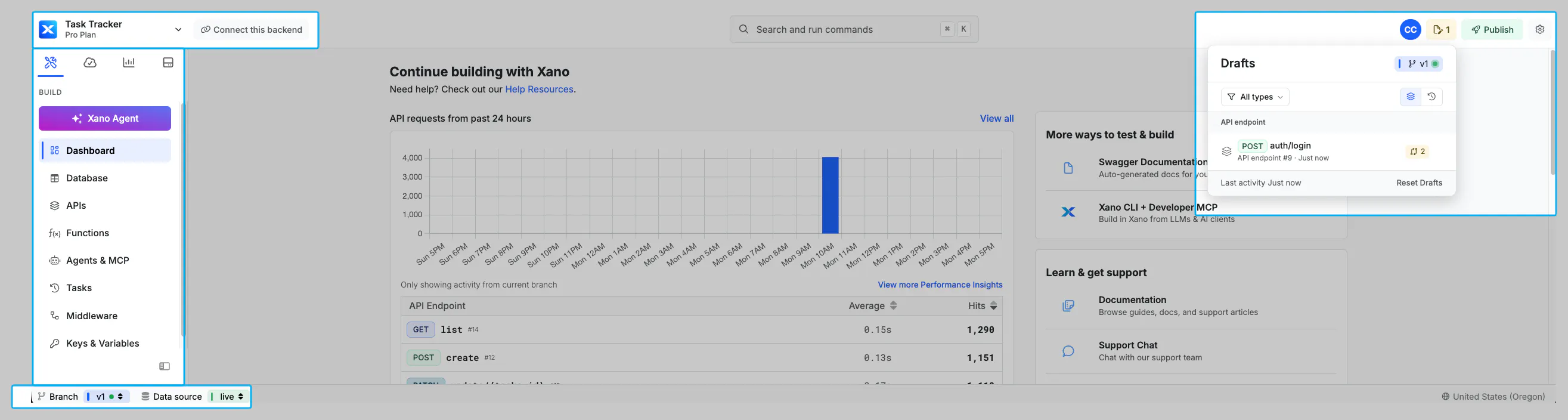
Here's what's new:
Global Publish: Publish from anywhere in your workspace, easily see your last published versions, and choose to quick publish or review the diff first.
Global Drafts: See drafts from anywhere, sort by type or recency, and jump into a draft file or view the diff against what's published.
New Settings modal: Always accessible from the top nav.
New Connect Hub: A single place showing Swagger docs, API & MCP URLs, frontend connection documentation, the database connector, and external database query info.
New Workspace selector: Combines previously separate menus into one simplified menu for workspace selection, account, billing, theme, and more.
Tabbed side navigation: Organized into Build, Test & Deploy, Monitoring, and File Hosting for increased feature visibility.
Cmd-K launcher: Switch workspaces without leaving your keyboard.
Footer bar: Branch switching and datasource switching always visible.
We've also cleaned up a bit. Addons now live within Database, environment variables and keys have their own dedicated section, and the Library drawer and Learn page have been retired. Check it out in your workspace, and let us know what you think.
