


We've significantly upgraded the review experience inside Xano Agent. Previously, reviewing what the agent built meant leaving the conversation, stepping into a separate modal, and stepping back to keep iterating—a workflow that broke flow state. Now, every change the agent makes is reviewable visually, inline, right alongside the agent chat.
Here's what changed:
Visual diff for all object types: Database schema changes render in the familiar dbo-overview, toolset and agent changes render in the toolset schema view, and function/query/task changes render in both the function stack and visual canvas. Raw XanoScript with full diff details is still available behind a toggle.
Inline review alongside the agent: A persistent file tree on the left lets you browse the workspace ("All files" mode) or jump to only what the agent changed ("Changes" mode, with a modification count badge). The middle pane is the diff viewer; the right pane is the agent chat. All three are visible and resizable at the same time.
Diff / Now toggle: See the proposed change against current state or edit the current file directly—without losing the diff context.
Real-time updates: As the agent modifies files, the file tree, change counts, and "Push to Draft" button update live without interrupting your conversation. Keep prompting while reviewing.
Database change safeguards: Schema changes that publish immediately are clearly flagged with a warning and require explicit confirmation on ‘Push to Drafts’.
Publish stepper: Distinguishes "Push to draft" (safely testable) from "Required publish" (immediate) so you always know which changes need extra care.
Now you can prompt, watch, and review in one continuous motion—and every object type has a visual review surface so you can understand changes at a glance without looking at the XanoScript.
Try it out by clicking the Xano Agent button in your workspace sidebar, and let us know what you think.
Error Logs, introduced in 2.3 inside per-object side panels, now has a full workspace-wide Monitoring dashboard. Errors are automatically grouped by signature, scored for urgency, and tracked through a complete lifecycle—turning hundreds of raw log lines into a single triageable entry per real bug.
Here's what's new:
"Open in Stack": One-click navigation from any error directly into the source function stack so you can fix it in place. No third-party error tool can do this.
"Configure Trigger": One-click automation that wires any error into a new or existing On Error Trigger — alert a Slack channel, page on-call, retry with backoff, or route to a fallback. (Paid plans only.)
Grouped error signatures: A single recurring bug shows up as one entry with a count and hourly sparklines, not 500 individual log lines. Aggregated across APIs, Functions, Tasks, Middleware, and Triggers.
Lifecycle status tracking: Every error signature is tracked as New, Regression, Ignored, or Fixed. A previously-fixed error that reappears is automatically flagged as a regression.
Version tracking: Know which version introduced the error and view the diff of that version.
Urgency scoring: Low / Medium / High / Critical tiers based on occurrence frequency and baseline statistics so the most impactful issues surface first.
Per-signature detail page: Error histogram, callers visualization (Sankey diagram and call tree), baseline statistics comparison, common payload analysis, version tracking, and stack-level recommendations.
Before this release, finding error patterns meant opening each API, function, task, middleware, and trigger one at a time. Now you can detect a regression, jump straight to the relevant statement, and wire up an automated response—all without leaving Xano.
The dashboard and Open in Stack are available on every plan. Error Triggers automation requires a paid plan. Try it out under Monitoring → Error Logs.
This is a solid upgrade for Xano teams. The combination of Error Logs, Version Tracking, and Open in Stack should make debugging and regression detection much faster.
The grouped signatures and urgency scoring are especially useful for cutting through log noise and focusing on real issues.
Request History now has a real home. It is elevated from a widget on the home Dashboard (limited to APIs) to a dedicated top-level Monitoring page with the analytical depth you'd expect from a standalone observability tool—and it covers every Xano primitive, not just APIs.
With the Request History Dashboard, you get:
Every primitive in one place: APIs, Functions, Tasks, Middleware, Triggers, and Tools—switchable via tabs without navigating away.
Interactive 24-hour histogram: Click and drag to zoom into a traffic spike or quiet period directly on the chart.
Summary analytics on every tab: Success rate %, p95 duration, and donut breakdowns of method mix (GET/POST/etc.), status distribution (2xx/3xx/4xx/5xx), and result distribution.
Filter by user across primitives: See the full activity of any authenticated user across your entire workspace in one view.
Tab-specific filters: Method, status, IP, authenticated user, and API group for APIs; runtime and caller for Functions; frequency and status for Tasks; target wraps for Middleware; action type, table, and datasource for Triggers; status for Tools.
Search, sort, and paginate: Search by URL or name depending on the tab, and sort by Time or Duration.
Full click-through detail panel: Headers, payload, response body, and execution details—the same depth previously only reachable through per-object side panels or for APIs from the Dashboard.
Before this, seeing workspace-wide traffic meant hopping between individual objects.
The per-object side panels still work for in-context debugging when you're already inside an object. The new dashboard is where you go for cross-workspace operations and analysis.
Check it out under the Monitoring tab in your workspace, and let us know what you think.

Awesome, great update.
Are there any plans to make this data available via the CLI? Or is the idea—the request history is already available via the metadata api, so we could theoretically build something ourself with the same source data if we wanted to?
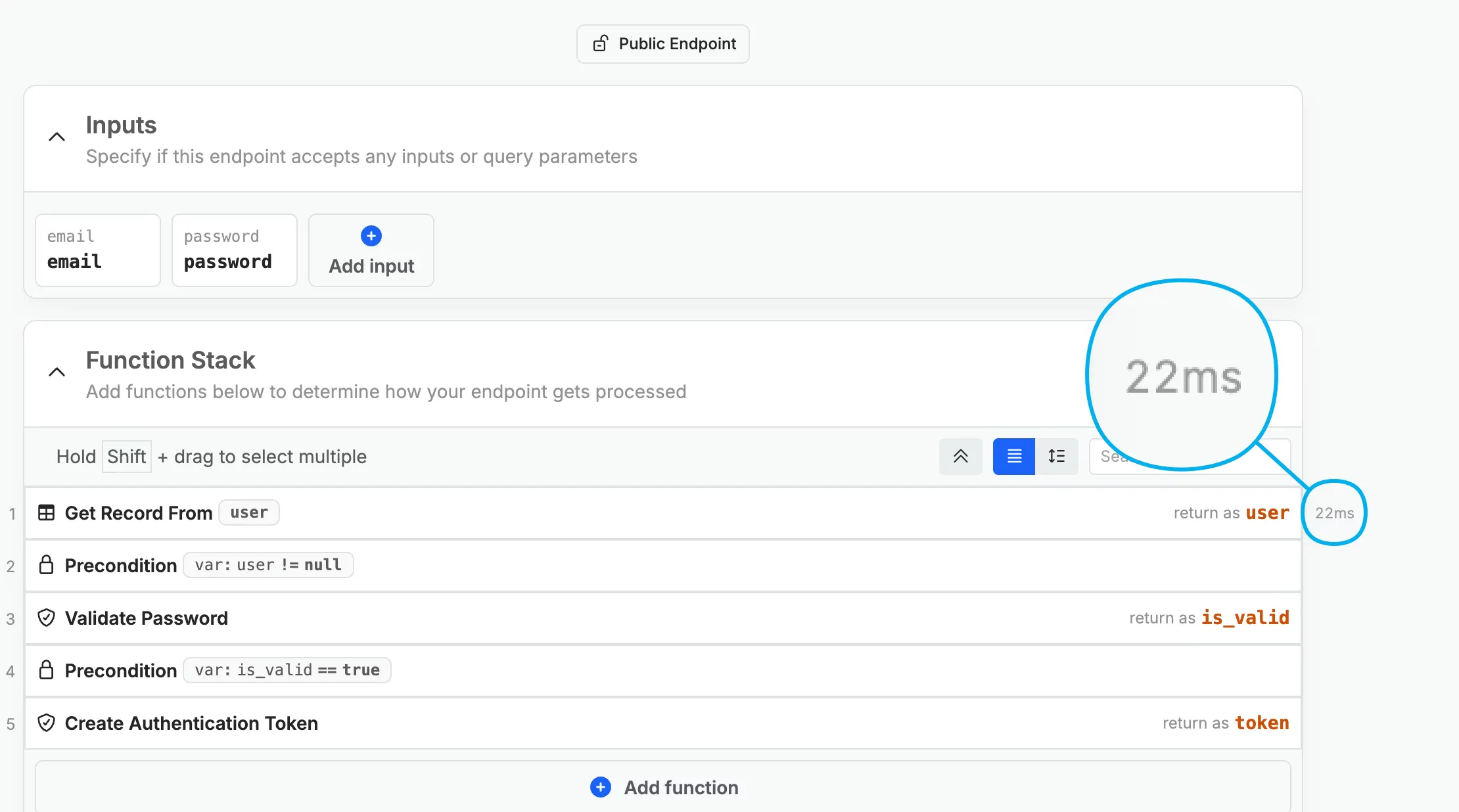
Performance Insights now surfaces execution time for each individual statement directly inline in the function stack—visible on hover, without leaving the editor. You can toggle the inline metric on or off per-user in Workspace Settings.
Error snapshots captured by Error Logs can also be opened directly in the stack, giving you a continuous path from spotting an error to investigating the performance of the logic around it.
Workspace-level Performance Insights already showed which endpoints are slow—but pinpointing the specific statement responsible meant cross-referencing timing data outside the editor. Bringing execution timing inline closes that loop so you can see exactly where time is being spent at the statement level, right where you're already reading and editing logic. Our updated Performance Insights documentation is here in case you want to learn more.
yeah this makes Performance Insights way more usable. before, finding the slow statement meant jumping between logs and metrics… now it’s right in the function stack.
inline execution time + error snapshots basically gives you a mini profiler inside the editor. much faster to pinpoint bottlenecks without breaking flow.
only concern is clutter in big functions, but since it’s toggleable, not really a blocker. solid upgrade.
Error Logs is a new observability feature that captures errors across all Xano stacks—API endpoints, tasks, functions, and triggers—and surfaces them in an aggregated, actionable view directly inside the product.
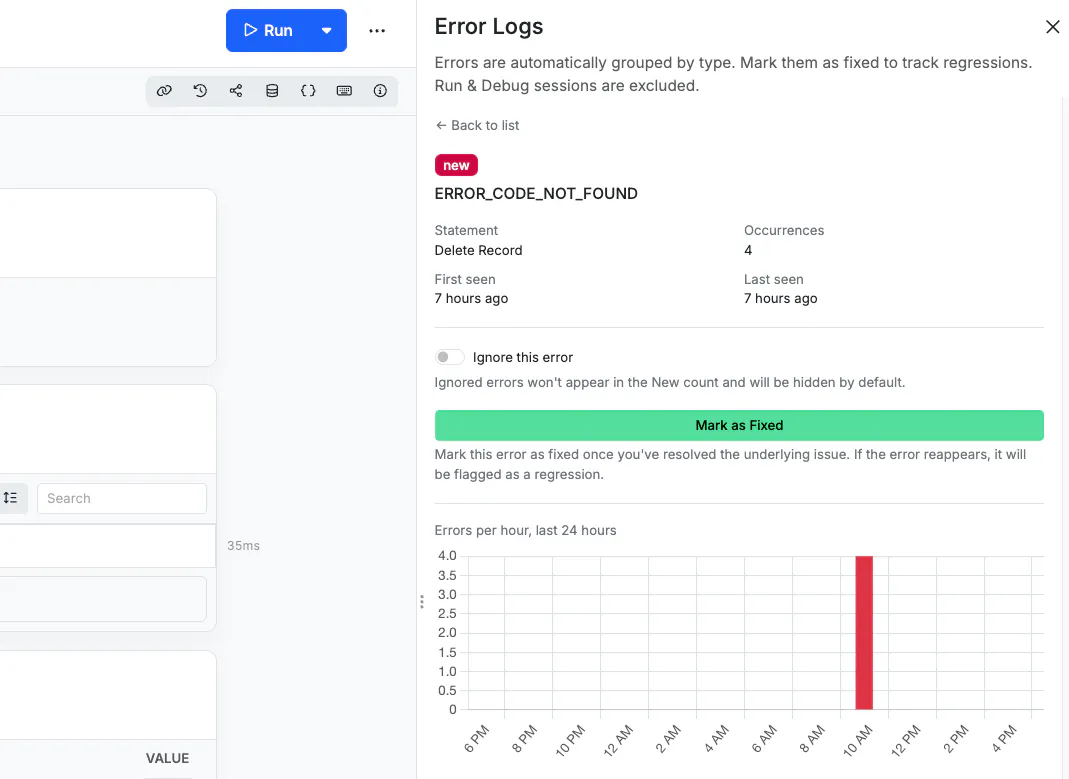
With Error Logs, you get:
Grouped errors: Repeated occurrences of the same error are tracked together by signature rather than flooding your view.
Occurrence count and timestamps: Get the details you need for each error.
The ability to mark errors as fixed or ignored: Useful for distinguishing real regressions from expected user input errors.
Full stack state snapshot: When you open an error, Xano loads the exact inputs, execution path, and point of failure at the moment it occurred.
30-day retention: Error snapshots are available for 30 days.
Before Error Logs, finding a production error meant manually combing through Request History with no aggregation, no grouping, and no way to know if an error happened once or a thousand times. Now you can see what's breaking, how often, and exactly what the stack looked like when it did.

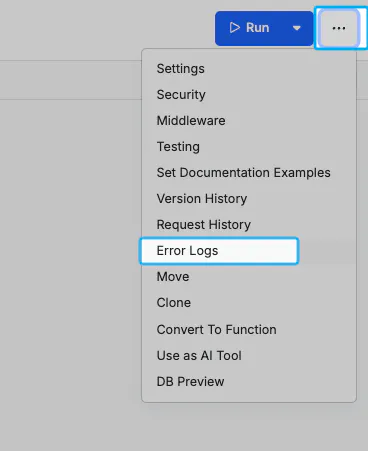
Error Logs can be found by accessing the menu in the top-right corner of your logic.
The Xano Developer MCP (@xano/developer-mcp) is a local MCP server that gives AI coding tools (Claude Code, Cursor, Windsurf, and any other MCP-compatible client) live XanoScript documentation, syntax validation, and workflow guides directly inside the AI tool.
With the Developer MCP, you get:
Real-time XanoScript validation using the official language server, so AI-generated code is checked for syntax errors before it ever reaches your workspace.
Context-aware documentation surfaced based on the file being edited, plus full documentation available on demand.
Step-by-step workflow guides for common Xano development patterns.
It installs in a single command and works with any MCP-compatible AI coding tool. Paired with the Xano CLI, it forms the complete code-first Xano workflow: the MCP ensures the AI understands XanoScript and generates valid logic, and the CLI is how that logic actually reaches your workspace.
Documentation is available in the Xano docs and on GitHub and NPM.
The Xano CLI now includes ephemeral sandbox environments as a structural safety layer for the code-first development workflow. When a paid user runs workspace push, they'll be blocked and prompted to first push to a sandbox environment.
Here's how it works:
xano sandbox push: changes to your sandbox
xano sandbox review: edit any logic, inspect the snapshot diff, and promote changes to your workspace
From your local workspace state, the CLI spins up an isolated ephemeral environment and surfaces a link for you to review and validate—before anything touches production. Environments time out after 2 hours (with a countdown warning at 15 minutes), and you can extend by 1 hour.
Once validated, the Review & Push flow gives you a human-in-the-loop path to promote changes to a workspace branch. If you want to remove this safety net and enable direct push, an admin can do so in Workspace settings or through the CLI.
Sandbox environments are available for paid plan users (one per user, unless you’re on a Custom pricing plan), and you can learn more in the Xano documentation.
